Call us USA (+1)312-698-3083
| Email : sales@wappnet.com

Releasing a mobile app without automation follows a familiar and painful pattern. A developer finishes a feature, opens Xcode or Android Studio, and begins the manual ritual: select the right scheme, choose the correct provisioning profile, archive, export, upload to App Store Connect or the Play Console, wait for processing, and finally send the build link to QA. Forty minutes later, if nothing went wrong, testers have a build. If something went wrong, the process starts again.
Scale that to a team of five developers shipping a weekly beta across two platforms and a range of device configurations to test, and the manual approach consumes a disproportionate amount of engineering time. More importantly, it introduces inconsistency: builds made on different machines with slightly different Xcode versions, different environment variables, and different provisioning profiles that may or may not be current. For any mobile app development company, these inefficiencies can slow delivery, increase QA burden, and make coordination across developers a constant challenge.
Mobile deployment automation addresses all of this. It is not a single tool; it is a set of practices and pipeline configurations that make every build reproducible, every test run consistent, and every distribution step automated to the degree the business chooses. This document covers the full picture: what automation encompasses, how it compares to the realistic alternatives, real pipeline configurations for GitHub Actions and GitLab CI, and case studies from teams that have implemented this at scale.

The problems with manual mobile releases are not unique to mobile. They are the same problems that afflicted web application deployments before CI/CD became standard practice. What makes mobile distinctive is the additional surface area: two operating systems with separate store processes, code signing infrastructure requiring careful credential management, and device fragmentation, meaning a build can pass automated tests and still crash on a specific OS and device combination.
Manual releases compound these problems. When builds are produced on individual developer machines, the environment is a variable. A developer who updated their Xcode last week may produce a build that behaves differently from one produced by a colleague who has not updated in a month. Provisioning profiles and certificates expire; in a manual workflow, the discovery that credentials have lapsed typically happens at the worst possible moment, preparing a hotfix build for a production incident.
The testing gap is equally significant. In a manual workflow, builds often go directly to QA without any automated verification. A build that crashes on launch, fails to authenticate, or renders incorrectly on a tablet arrives in testers’ hands and begins consuming QA time before any automated checks have been run. This is a structural problem with a workflow that has no quality gate between the developer and the tester.
Distribution itself is a serial bottleneck. Getting the right build to the right testers requires uploading to TestFlight or the Play Console, waiting for processing, and notifying the testing group. Each step is manual, each step can fail, and the cumulative delay between a developer finishing a feature and a tester having a working build frequently reaches two or three hours. In a team shipping frequently, this compounds into a significant drag on delivery velocity.
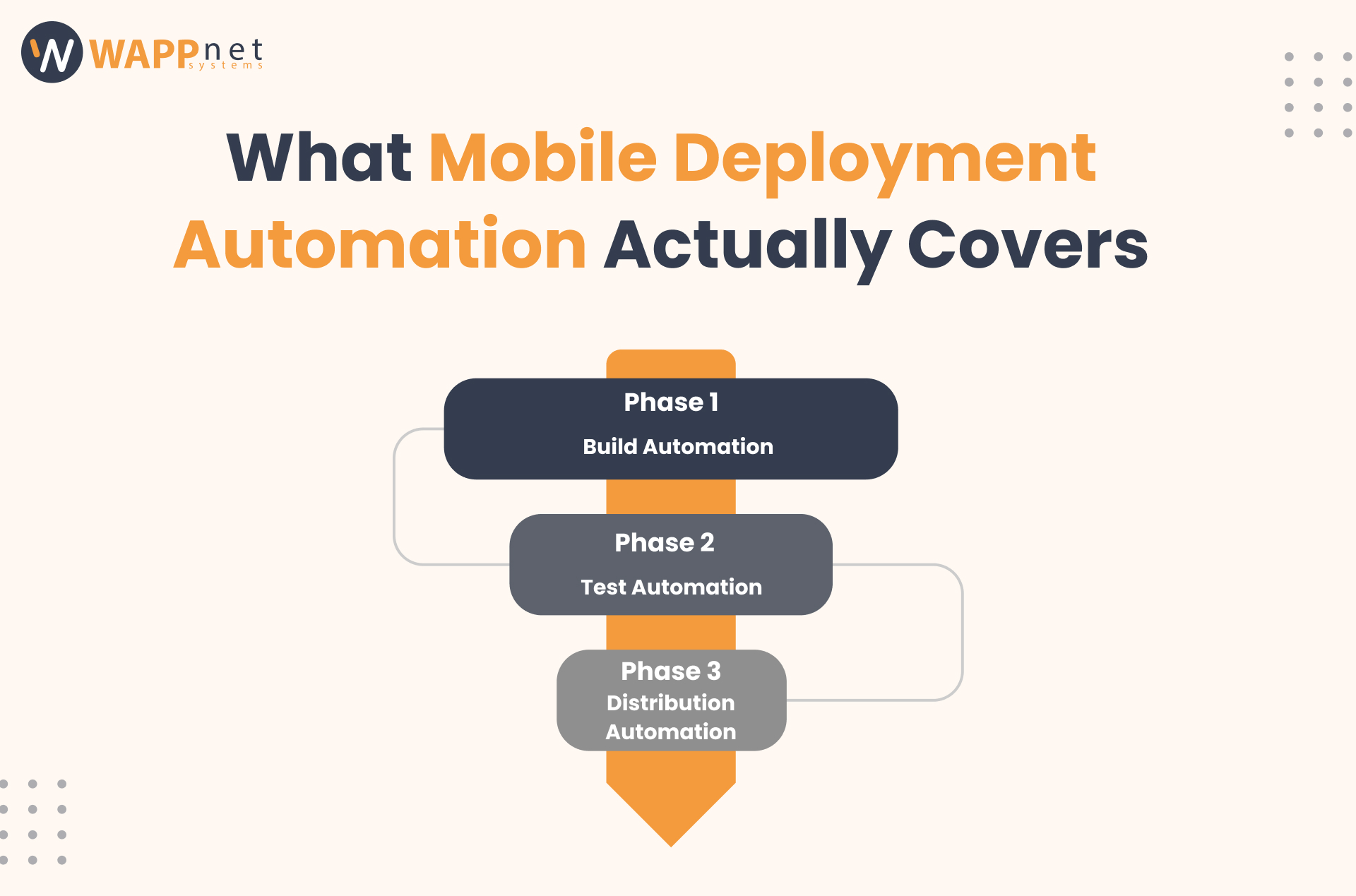
Mobile deployment automation encompasses three distinct phases: build, test, and distribution. Understanding each phase is important for scoping the investment correctly. Teams often start with build automation and add test and distribution automation incrementally as confidence in the pipeline grows. Implementing these practices is critical for teams offering mobile app development services, ensuring that every release is consistent, traceable, and delivered with high quality.
Build automation means every build is produced in a defined, reproducible environment rather than on a developer’s local machine. The CI environment specifies the exact Xcode version, Android SDK version, Node or Ruby version, and any other dependencies. When a developer merges a change, the pipeline checks out the code, installs dependencies, and produces a build artifact in exactly the same way every time.
For iOS this means a macOS CI runner, an xcodebuild command (or a Fastlane lane that wraps it), and a signing process that injects the provisioning profile and certificate from a secrets manager rather than relying on a developer’s local keychain. For Android, this means a Linux runner, a Gradle build command, and a signing process that injects keystore credentials from a secrets manager.
Test automation in the mobile context operates at two levels. Unit and integration tests run in CI on every change, giving fast feedback within minutes. UI and device tests run against emulators or real devices in a cloud device farm, providing broader coverage at the cost of longer run times.
The practical starting point is unit and lint checks on every pull request, with UI tests running on merge to main or on a nightly schedule. This balances feedback speed against coverage. Requiring full device farm runs on every PR is expensive in both time and cost; requiring only lint and unit tests leaves device-specific failures for testers to discover.
Distribution automation means a passing build is automatically uploaded to TestFlight for iOS and to Internal Testing on the Play Console for Android, without manual intervention. Testers receive a notification that a new build is ready. The feedback loop from merge to testable build shrinks from hours to minutes.
Production submission remains a separate, deliberate decision. Most teams retain a manual trigger for final submission to App Store review and Play Store production, because this decision involves business judgment—timing, feature readiness, marketing coordination—that should not be automated away. Automation provides a ready, signed, validated artifact waiting for the human decision to promote it.
For teams using React Native with Expo or a Flutter OTA equivalent, over-the-air updates represent a third distribution path. OTA updates ship only the JavaScript bundle, bypassing the store build process entirely for changes that do not touch native code. Automating OTA follows the same pattern: trigger on merge, run checks, and publish to the target channel.
The conceptual pipeline is identical for both platforms. The specific tooling, runner requirements, and store submission process differ in important ways. The table below summarizes the practical differences.
| Step | iOS | Android |
|---|---|---|
| Build runner | macOS (required for Xcode) | Linux (Gradle runs fine) |
| Build artefact | .ipa (archive + export) | .aab (App Bundle) or .apk |
| Signing tooling | Xcode / Fastlane match | Gradle signingConfig / Fastlane supply |
| Credentials | Cert + provisioning profile | Keystore + key alias + passwords |
| Beta distribution | TestFlight (App Store Connect) | Play Internal Testing |
| Prod submission | App Store review (1-3 days) | Play Console (hours to 1 day) |
| OTA support | Expo Updates / CodePush (RN) | Expo Updates / CodePush (RN) |
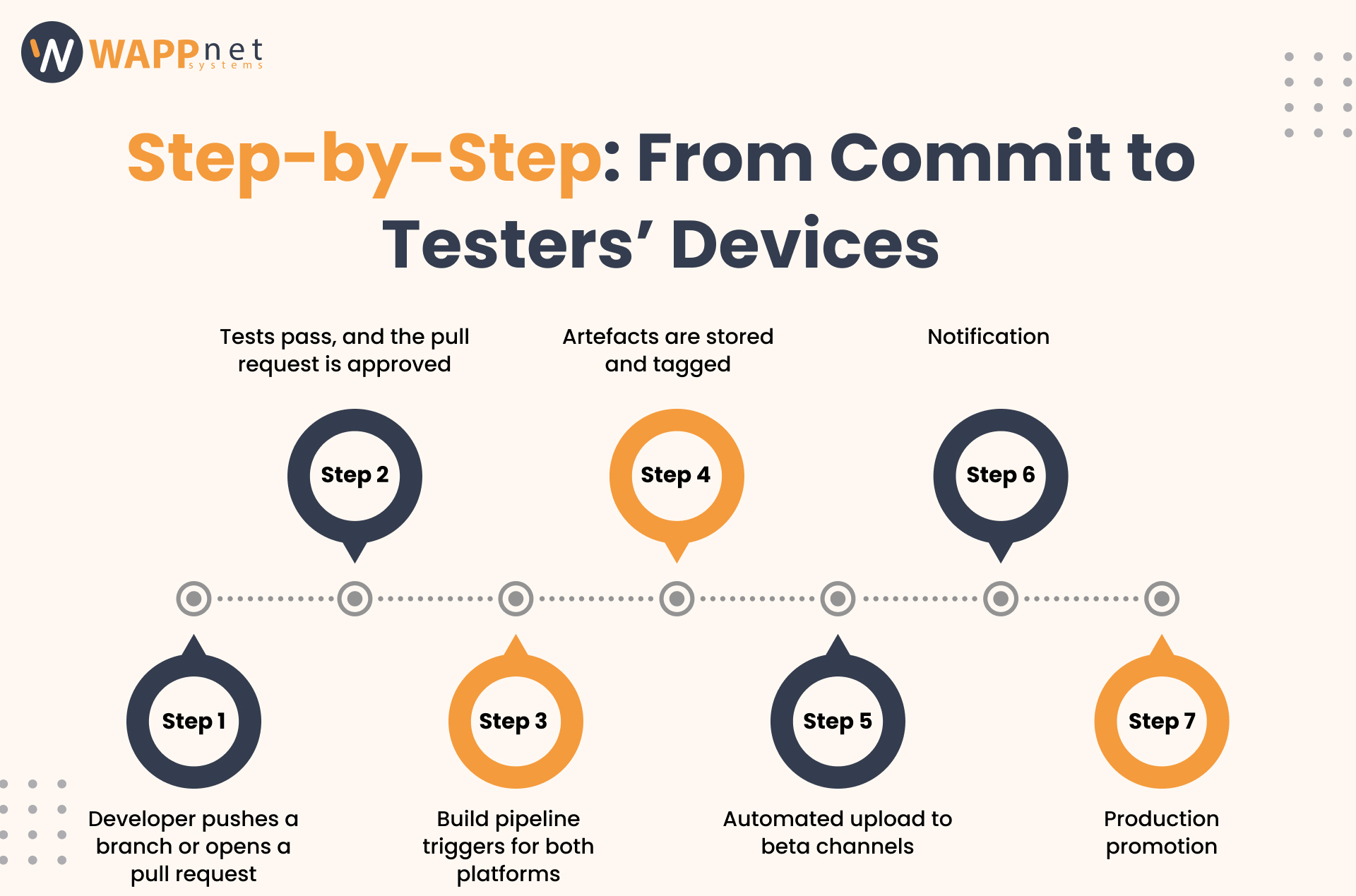
The following describes the typical shape of a fully automated mobile CI/CD pipeline from when a developer pushes code to when testers have a build in hand. The tools at each step are noted but interchangeable; the structure is consistent across most production engineering organizations.
Tests run on every push and pull request. The full build and upload to TestFlight and Play Internal runs only on merge to main. Path filters ensure the pipeline only triggers when app code changes.
# .github/workflows/mobile-release.yml name: Mobile Build & Deploy on: push: branches: [main] paths: [‘app/**’, ‘package.json’] pull_request: branches: [main] paths: [‘app/**’, ‘package.json’] jobs: test: runs-on: ubuntu-latest steps: – uses: actions/checkout@v4 – uses: actions/setup-node@v4 with: { node-version: ’20’, cache: ‘npm’ } – run: npm ci – run: npm run lint && npm test build-ios: needs: test if: github.ref == ‘refs/heads/main’ runs-on: macos-latest steps: – uses: actions/checkout@v4 – uses: actions/setup-node@v4 with: { node-version: ’20’, cache: ‘npm’ } – run: npm ci && cd ios && pod install – run: npx eas build –platform ios –profile production –non-interactive env: APP_STORE_CONNECT_API_KEY_ID: ${{ secrets.ASC_KEY_ID }} APP_STORE_CONNECT_ISSUER_ID: ${{ secrets.ASC_ISSUER_ID }} APP_STORE_CONNECT_API_KEY: ${{ secrets.ASC_API_KEY }} build-android: needs: test if: github.ref == ‘refs/heads/main’ runs-on: ubuntu-latest steps: – uses: actions/checkout@v4 – uses: actions/setup-node@v4 with: { node-version: ’20’, cache: ‘npm’ } – run: npm ci – run: npx eas build –platform android –profile production –non-interactive env: EXPO_TOKEN: ${{ secrets.EXPO_TOKEN }} EAS_PROJECT_ID: ${{ secrets.EAS_PROJECT_ID }}
GitLab CI: Flutter Pipeline with Fastlane Distribution
Three stages: test, build, and deploy. The build stage produces signed artifacts; the deploy stage uses Fastlane to push to TestFlight and Play Internal. The when: manual option keeps distribution a deliberate step. Change to on_success for fully automatic beta distribution.
# .gitlab-ci.yml stages: [test, build, deploy] test: stage: test image: cirrusci/flutter:stable before_script: [flutter pub get] script: [flutter analyze, flutter test] only: { changes: [lib/**/*] } build_ios: stage: build image: cirrusci/flutter:stable script: – flutter pub get – flutter build ipa –export-options-plist=ios/ExportOptions.plist artifacts: paths: [build/ios/ipa/*.ipa] only: [main] build_android: stage: build image: cirrusci/flutter:stable script: – flutter pub get – flutter build appbundle –release artifacts: paths: [build/app/outputs/bundle/release/*.aab] only: [main] deploy_ios: stage: deploy image: ruby:3.2 before_script: [gem install fastlane] script: [cd ios && fastlane ios beta] only: [main] when: manual deploy_android: stage: deploy image: ruby:3.2 before_script: [gem install fastlane] script: [cd android && fastlane android internal] only: [main] when: manual
From weekly beta builds to daily automated distribution across iOS and Android
Duolingo’s mobile engineering team manages simultaneous iOS and Android development for one of the highest-traffic consumer apps globally. In public engineering posts, they describe transitioning from a release process that requires a dedicated release engineer role to one where builds are produced, tested on a device farm, and automatically distributed to internal testers on every merge to main.
The key investments were standardizing on a single CI platform across both mobile teams, implementing a cloud device farm for UI tests to catch device-specific rendering issues before distribution, and building Fastlane-based signing automation that eliminated the single-developer certificate bottleneck. The outcome was a reduction in time-to-tester from several hours to under twenty minutes and the elimination of the release engineer role as a separate function: every mobile engineer could ship without specialist help.
Before investing in full pipeline automation, it is worth understanding what you are comparing against and what level of automation is appropriate for your team’s current stage. The table below summarizes three approaches across the dimensions that matter most for mobile delivery.
| Criteria | Fully Manual | Scripts Only (No CI) | Full Pipeline Automation |
|---|---|---|---|
| Build consistency | Machine-dependent | Same script, diff env | Identical env every time |
| Time to TestFlight | 30-90 min (manual) | 15-30 min | 5-15 min (automated) |
| Signing management | Ad hoc / per-person | Shared but manual | Secrets manager + CI injection |
| Test gate | None before distribution | Unit tests only | Unit + UI + device farm |
| Rollback | Rebuild from scratch | Re-run script manually | Re-promote previous artefact |
| OTA updates | Not supported | Manual publish | Automated channel promotion |
| Audit trail | None | Script logs only | Commit, build number, deploy time |
| Team scalability | Single-person bottleneck | Better — documented steps | Any merge triggers pipeline |
A fully manual release process is acceptable for a solo developer with a low release cadence (monthly or less) and a single app. The overhead of configuring a CI/CD pipeline is not justified in that context. The moment a second developer joins or release frequency increases to weekly, the inconsistency and coordination costs of the manual approach begin to outweigh the setup cost of automation.
A common intermediate state is a set of shared Fastlane lanes that standardize the build and upload commands without running them in a CI environment. This is better than fully manual because it eliminates the knowledge-dependent ritual and gives a reproducible command. It is worse than full pipeline automation because it requires a developer to run the commands on their local machine, meaning the environment remains variable, credentials must still be managed locally, and the process does not trigger automatically on merge.
Full pipeline automation becomes clearly superior with two or more developers, a release cadence of weekly or higher, or a compliance requirement for build auditability. The upfront investment is in pipeline configuration, CI provider costs for macOS runners, and credential management. The ongoing return is consistent builds, automated testing before every distribution, and a release process that any engineer can trigger.
Mobile CI/CD has several friction points that web or backend pipeline automation does not. Understanding them in advance allows you to plan for them rather than discover them mid-implementation.
iOS builds require macOS. GitHub-hosted macOS runners are available but billed at significantly higher rates than Linux runners, and availability can be constrained during peak periods. Self-hosted Mac Minis connected to CI are a common cost optimization for teams with high build volumes. The trade-off is the operational overhead of maintaining the machines and keeping Xcode current. For most teams, starting with hosted runners and moving to self-hosted as volume grows is the pragmatic path.
Apple’s code signing infrastructure is complex. Provisioning profiles tie bundle identifiers to certificates to distribution entitlements. Managing this manually across a team is a constant source of friction and broken builds. Fastlane Match, which stores encrypted certificates and profiles in a Git repository or cloud storage and synchronizes them to the CI environment at build time, is the standard solution. It requires initial setup and ongoing maintenance as certificates are renewed annually.
iOS builds are slow. A fresh build of a moderately complex React Native or Flutter app on a macOS CI runner takes eight to fifteen minutes. Caching CocoaPods dependencies and node modules reduces this meaningfully, but a minimum floor remains. Android builds on Linux are faster, typically three to eight minutes. Budget for macOS runner time on the iOS side, use caching aggressively, and use path filters to avoid triggering mobile builds on unrelated code changes.
Fastlane is the de facto standard for automating iOS and Android build and distribution steps. EAS is the standard for Expo-based React Native projects. Codemagic is a purpose-built mobile CI/CD platform that handles much of the configuration complexity out of the box at the cost of less flexibility. Pick one approach and standardize across all apps and teams. The cost of maintaining multiple tooling conventions is higher than the cost of a one-time migration to a single standard.
| READINESS CHECKLIST |
| ✓ Are all signing credentials (certs, profiles, keystores) stored in a secrets manager, not on developer machines? |
| ✓ Does every build trigger run unit tests before producing a distributable artifact? |
| ✓ Is every distributed build tagged with a commit SHA so you can trace exactly what is in it? |
| ✓ Can any developer on the team trigger a release build without needing a specific machine or credential? |
| ✓ Is a rollback to a previous build a matter of redistributing a previous artifact, not a fresh build from source? |
Unified mobile CI/CD across iOS and Android for a globally distributed engineering team
Shopify’s mobile platform team manages iOS and Android applications developed by engineers distributed across multiple time zones. In public engineering posts, they describe investing in a mobile CI/CD platform that treats both platforms consistently: the same pipeline structure, the same secret management approach, and the same artifact tagging conventions.
A significant part of their investment went into automated UI tests running against a device farm, which they found was the most effective catch for the class of bugs that manual testing and unit tests both miss: gesture recognition failures, keyboard interaction bugs, and rendering issues specific to certain device and OS version combinations. Moving to automated distribution eliminated a class of release coordination meetings that had previously consumed several hours of engineering time per week across the mobile teams.
Mobile deployment automation is not a single tool. It is a set of practices that, when implemented together, eliminate the inconsistency, friction, and coordination overhead that accumulates around manual mobile release processes.
Build automation ensures every artifact is produced in a defined, reproducible environment with credentials managed securely and invisibly to the developer. Test automation ensures every build distributed to testers has passed an automated quality gate and that device-specific failures are caught before they consume QA time. Distribution automation ensures testers have access to a new build within minutes of a merge, without any developer performing a manual upload.
The app store review process and the business decision to submit to production remain deliberate human gates, as they should. Automation does not remove them. What it does is ensure that everything before those gates is fast, consistent, and fully auditable so that the time between a developer completing a feature and a user having it in their hands is as short as the stores allow. This structured approach is essential for mobile app development, especially when teams are shipping frequently across multiple platforms and devices.
The investment is real: macOS runner costs for iOS, credential management infrastructure, and tooling standardization across platforms. The return is equally real: faster time to tester, fewer bad builds reaching QA, full audit trails for compliance, and a release process that any engineer on the team can initiate rather than one that depends on a specific person with a specific machine and an up-to-date certificate.