Call us USA (+1)312-698-3083
| Email : sales@wappnet.com

How do we run many services in a repeatable way so that the business can move fast and ops can sleep at night?
If you have been in IT for a decade or more, you have watched the pendulum swing from big monoliths to service-oriented architecture to microservices and back to “maybe not everything should be a service.” What has not swung back is how we package and run software.
Docker and Kubernetes have quietly become the industry default, not because they are fashionable, but because they solve concrete, painful problems that every engineering organization eventually runs into.
This document covers three angles: what problem the stack actually solves, how it compares to the realistic alternatives, and what a real deployment looks like step by step.
It is written for both the engineer who will live in this world every day and the decision-maker who needs to understand what is being invested in and what the return looks like.

Before containers, “it works on my machine” was not a joke. It was the lived experience of almost every software team.
Different OS patch levels, different runtime versions, and different environment variables set by different people on different days. Deployments were manual events. Scaling meant provisioning servers by hand and configuring them individually.
Rollbacks were frightening enough that teams sometimes chose to push forward through a bad release rather than attempt one. Without containerized applications and a standardized Docker-based deployment process, environment inconsistency was inevitable.
Microservices made ownership and scaling cleaner, but they also multiplied every operational problem. Where you once had one app to deploy, you now had twenty. Where you once had one runtime to manage, you now had five.
The combinatorial complexity of “which version of service A is compatible with which version of service B, running on which OS, configured by which environment file” became genuinely unmanageable with traditional tooling.
Containers solve the packaging problem. Kubernetes solves the orchestration problem. Together they answer the question that sits underneath almost every infrastructure decision in a product company: how do we run many services predictably at scale without it consuming the entire engineering organization?
A Docker container image is a self-contained, immutable snapshot of an application and everything it needs to run: the runtime, the libraries, the configuration defaults, and the filesystem structure. Once built, that image behaves identically on a developer laptop, a CI server, a staging environment, and a production cluster. The environment stops being a variable.
That single property eliminates an entire category of bugs and delays. The QA team tests exactly the artifact that will go to production. The on-call engineer debugging a production issue can reproduce it locally with a single command. The new hire who joins on Monday can have the full system running by Monday afternoon, not after a week of wrestling with a setup document that was last updated eighteen months ago.
From 150 manual deployments per day to continuous delivery at scale
Spotify migrated from a VM-based deployment model to containers as their microservices footprint grew past 800 services. Before the migration, deploying a service required manual steps, environment-specific configuration files, and significant coordination between teams. After containerizing, deployment frequency increased dramatically, onboarding time for new engineers dropped from days to hours, and the company was able to enforce consistent security scanning across all services as a pipeline gate rather than a manual checklist.
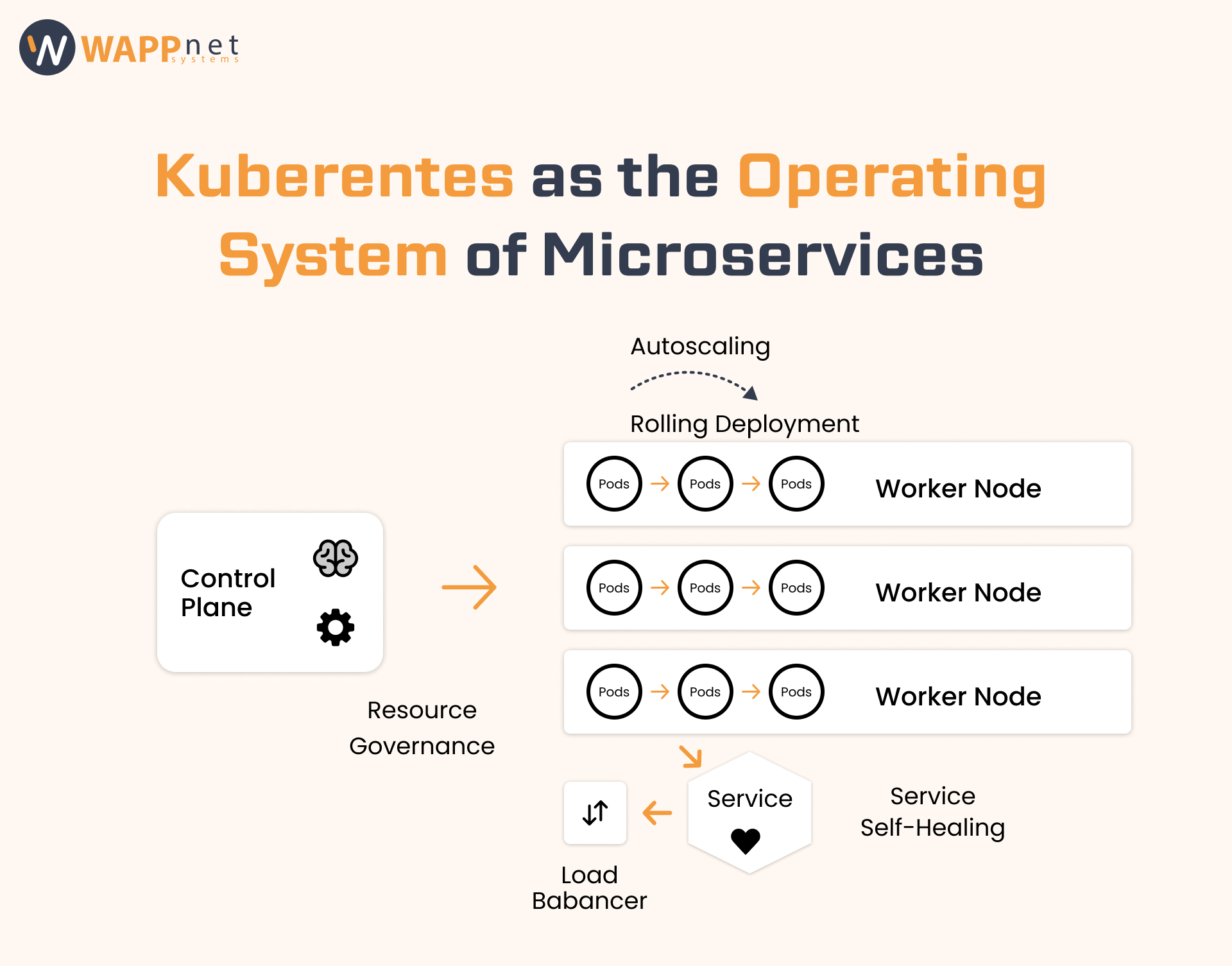
Docker solves packaging. It does not solve the question of where to run containers, how many copies to run, what to do when one crashes, how to roll out a new version without downtime, or how to route traffic between services.
Those are orchestration problems, and Kubernetes is the most mature, widely adopted answer to them. These orchestration challenges are addressed through Kubernetes, which powers modern microservices deployment at scale.
Think of Kubernetes as the operating system for your microservices fleet. It schedules workloads across a pool of compute nodes, automatically restarts failed containers, scales replicas up and down based on demand, manages service discovery and internal networking, and provides a declarative API that lets you describe the desired state of your system and then continuously work to achieve it.
When a pod (a running container instance) crashes, Kubernetes restarts it within seconds, without human intervention. When a node (a VM or physical server) fails, the pods that were running on it are rescheduled to healthy nodes.
For most failure modes, the platform recovers before a human has had time to acknowledge the alert. Teams that have moved from VM-based deployments to Kubernetes consistently report a significant reduction in after-hours pages from infrastructure failures.
Kubernetes supports both horizontal pod autoscaling (adding more replicas of a service when CPU or memory pressure rises) and vertical scaling (increasing the resources allocated to a pod). This means you can size your cluster for average load and scale automatically to handle peaks, rather than over-provisioning permanently for the worst case.
For product companies with predictable traffic patterns, such as e-commerce sites around sales periods, this translates directly into lower cloud spend.
A rolling deployment replaces old pods with new ones gradually. Kubernetes checks that each new pod passes its readiness probe before proceeding and halts the rollout if health checks start failing.
If a deployment goes wrong, rolling back is a single kubectl command that reinstates the previous image. Releases stop being coordinated, all-hands events and become routine operations that a single engineer can execute and monitor in minutes.
Kubernetes exposes the same API and the same conceptual model whether you are running on AWS EKS, Google GKE, Azure AKS, or your own on-premises cluster.
The same Helm charts, the same manifests, and the same operational practices transfer between environments. This matters both for avoiding vendor lock-in and for enabling teams to work across clouds without retraining.
Kubernetes allows you to set resource requests (the minimum a pod needs) and limits (the maximum it can consume) for CPU and memory on a per-service basis. This prevents a runaway service from starving others on the same node, makes capacity planning tractable, and gives FinOps teams the visibility they need to right-size workloads.
Bin-packing, where Kubernetes fits as many pods as possible onto each node, also significantly improves hardware utilization compared to the traditional model of one application per VM.
Scaling from hundreds to thousands of microservices without proportional ops growth
Airbnb’s engineering organization grew to over 1,000 microservices. Without a centralized orchestration layer, the operational cost of managing that fleet would have required a proportionally large platform engineering team.
By standardizing on Kubernetes, Airbnb was able to provide self-service deployment infrastructure to hundreds of product engineers, implement consistent observability (logging, metrics, tracing) as a platform-level concern rather than per-team work, and enforce resource quotas that prevented individual teams from inadvertently impacting cluster stability.
The key insight from their public engineering posts is that Kubernetes did not just reduce ops costs; it changed the ratio of engineers who could ship features versus engineers who had to maintain infrastructure.
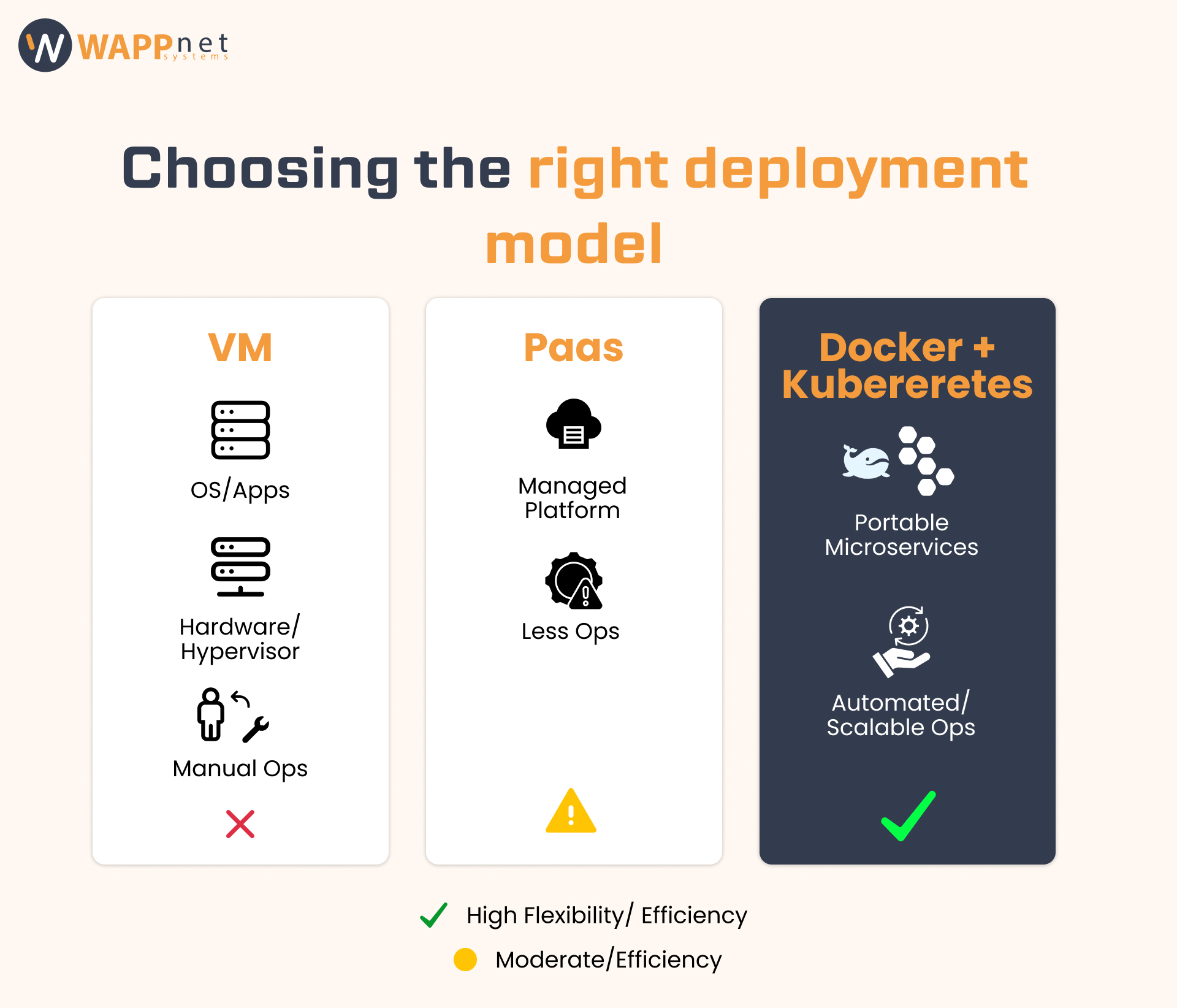
Before committing to Docker and Kubernetes, it is worth being honest about the alternatives. Every approach has trade-offs, and the right choice depends on team size, service count, scaling requirements, and how much platform investment you are willing to make.
| Criteria | Bare-Metal VMs | PaaS (Heroku / App Engine) | Docker + Kubernetes |
|---|---|---|---|
| Portability | Low — OS-tied | Medium — provider-tied | High — runs anywhere |
| Startup time | Minutes | Seconds–minutes | Seconds |
| Density | Low (1 app / VM) | Managed by provider | High (many pods / node) |
| Scaling control | Manual / scripted | Auto but opaque | Fine-grained + automated |
| Rollback | Risky / slow | Limited | Single command |
| Vendor lock-in | Low (but ops-heavy) | High | Low |
| Ops overhead | Very high | Low (but costly at scale) | Medium (managed K8s lowers this) |
| Cost at scale | High (over-provision) | High (per-dyno pricing) | Lower (bin-packing) |
Virtual machines remain appropriate for stateful workloads with specific OS requirements, for legacy applications that cannot be containerised without significant re-architecture, or for teams with very small service counts where the overhead of Kubernetes is not justified. The operational burden is high, but the conceptual model is familiar and the isolation is complete.
Platforms like Heroku, Google App Engine, or Render are genuinely excellent choices for small teams or early-stage products. They abstract away infrastructure entirely, deployments are a git push, and you can go from nothing to a running application in an afternoon. The cost is control: you accept the platform’s scaling model, its networking model, and its pricing structure. As service count and traffic grow, PaaS costs tend to become significant, and the lack of control over the underlying infrastructure can become a constraint.
The container and orchestration stack starts to clearly outperform the alternatives when you have multiple services, multiple environments, real scaling requirements, and a need for the deployment process itself to be automated and auditable. The upfront investment is higher than a PaaS, but the long-term cost per service, the flexibility, and the vendor independence are materially better at scale.
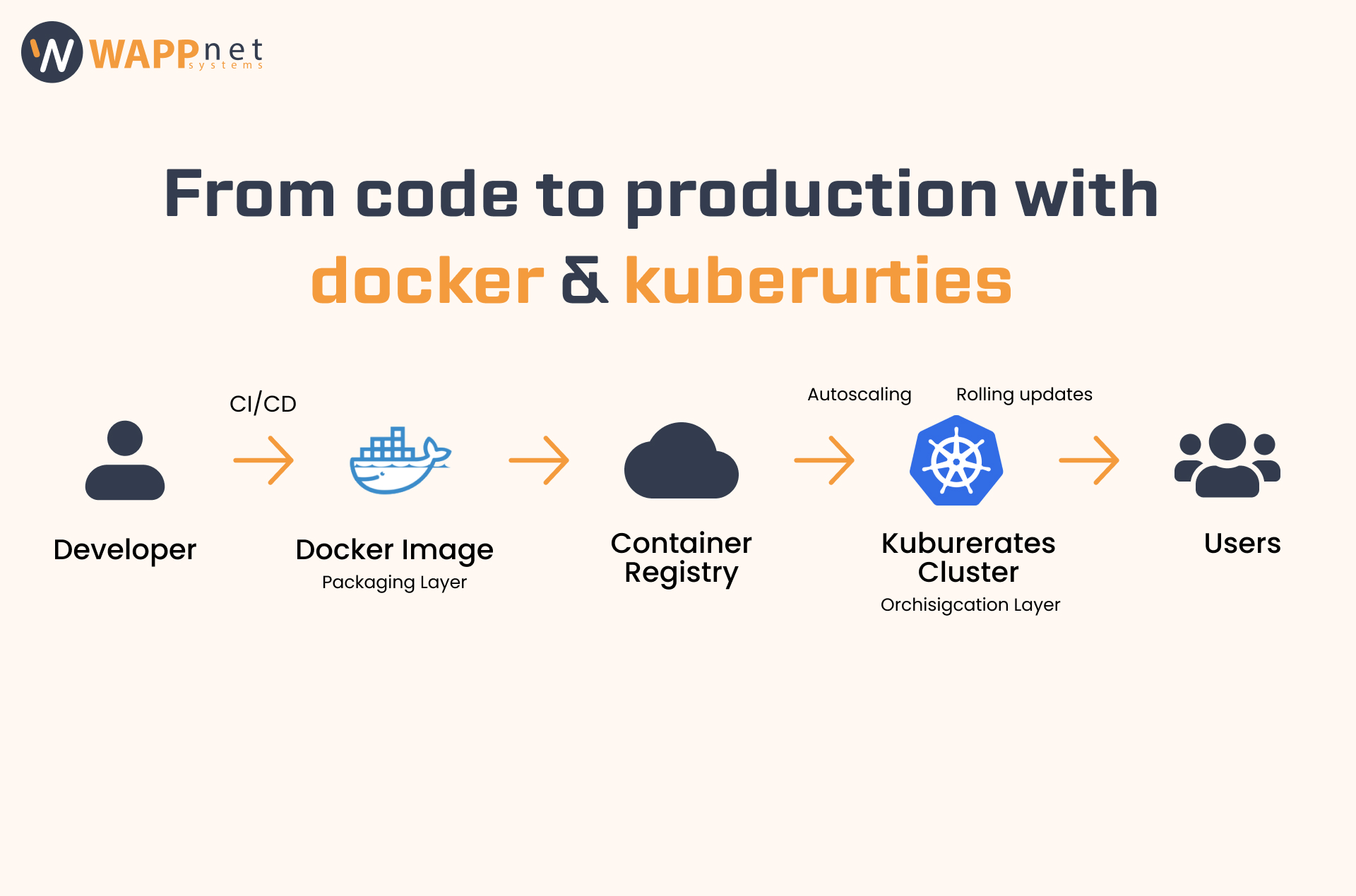
The following walkthrough covers the practical path from application code to a running, observable service in a Kubernetes cluster. It is intentionally illustrative rather than prescriptive; the specific tools at each step can vary, but the shape of the process is consistent across most organisations.
Write a Dockerfile: At the root of the service repository, define the base image, copy in the application code, install dependencies, and specify the command to run. For a Node.js service, this is typically five to ten lines. For a Python or Go service, similar.
Build and tag the image: Run docker build to produce a local image. Tag it with a version that references the git commit (e.g., my-service:a3f9b21). This is usually done in CI, not manually.
Push to a container registry: Push the image to a registry, such as AWS ECR, Google Artifact Registry, or Docker Hub. The registry is the source of truth for all deployable artefacts. Access controls on the registry are your first line of defence against running unauthorised code in production.
Write a Deployment manifest: A Deployment declares the desired state: which image to run, how many replicas, what resources to request, and what health checks to use (liveness and readiness probes). This file is committed to source control alongside the application code.
Write a Service manifest: A Service exposes the pods to the rest of the cluster (or to the internet via a LoadBalancer or Ingress). It handles service discovery so that other services can reach yours by name rather than by IP address.
Add ConfigMaps and Secrets: Configuration that varies by environment (database URLs, feature flags) goes into ConfigMaps. Sensitive values (passwords, API keys) go into Secrets, which can be backed by a secrets manager like AWS Secrets Manager or HashiCorp Vault.
Apply the manifests via CI/CD: In a GitOps workflow, merging to main triggers a pipeline that applies the updated manifests to the cluster using kubectl apply or a tool like Argo CD. The cluster reconciles the desired state with the actual state and begins the rolling update.
Monitor the rollout: Watch pod status in real time. Kubernetes surfaces readiness probe failures immediately. If health checks fail, the rollout pauses and the old version continues serving traffic.
Verify observability: Confirm that logs are flowing to your logging stack (e.g., Datadog, Grafana Loki, CloudWatch), that metrics are being scraped by Prometheus, and that traces are appearing in your tracing backend. These are not optional extras; they are the instruments you need to operate the service safely.
Roll back if needed: If anything looks wrong, kubectl rollout undo deployment/my-service reinstates the previous version within seconds. The old pods come back up before the new ones are fully terminated.
Cutting deploy time from 45 minutes to under 4 minutes
A B2B SaaS company with 12 microservices was running each service on a dedicated EC2 instance, deployed via Ansible scripts triggered manually by the platform team. Each deployment took 30 to 45 minutes and required the deploying engineer to babysit the process. After migrating to EKS with a GitOps pipeline, average deployment time fell to under four minutes, deployments became fully automated with no human in the loop, and the platform team was freed from deployment support to work on higher-value infrastructure projects. The business effect was faster release cycles and a significant reduction in the cost of the platform team’s time per deployment.
Kubernetes is powerful, but it is not simple. The learning curve is real, and the upfront investment in tooling and process is genuine. A clear-eyed view of what you are taking on is essential for making the case internally and for planning the migration correctly.
If you have one or two services, a single environment, and no real scaling requirements, Docker Compose on a single server or a managed PaaS is a perfectly reasonable choice. Kubernetes becomes valuable when the operational complexity of managing multiple services manually exceeds the operational complexity of running a cluster. For most product companies with more than five or six services, that crossover point has usually been reached.
Docker and Kubernetes are not a silver bullet, and they are not the right answer for every team at every stage. But for organisations running multiple services that need to be deployed, scaled, and updated independently, they represent the most proven, most portable, and most operationally mature answer available.
Docker gives you the foundation: a single, immutable, portable artefact for each service that behaves identically everywhere it runs. Kubernetes gives you the operational layer: the scheduler, the self-healing, the autoscaler, the rolling deployer, and the consistent API surface that works the same whether you are on AWS today or moving to GCP next year.
The business return is not abstract. Faster deployments mean faster feature delivery. Self-healing infrastructure means fewer outages and less on-call burden. Autoscaling means you stop paying for capacity you do not need and stop scrambling for capacity when traffic spikes. Image-based deployments mean security and compliance teams can enforce policies programmatically rather than trusting processes.
| THE DECISION FRAMEWORK |
| ✓ Do you have more than five services that need independent deployment and scaling? |
| ✓ Do you need to run the same workloads across multiple environments reliably? |
| ✓ Is your team’s on-call burden disproportionately caused by infrastructure failures rather than application bugs? |
| ✓ Are manual deployments slowing down your release cadence or requiring engineer oversight? |
| ✓ Are you starting to see cloud cost inefficiency from over-provisioned VMs? |
If the answer to two or more of those questions is yes, the investment in Docker and Kubernetes will pay for itself. The question is not whether to move in this direction. The question is how to pace the transition so that the platform investment accelerates rather than disrupting the product teams that depend on it.
What is the difference between Docker and Kubernetes?
Docker is a containerization platform, while Kubernetes is a container orchestration system that manages deployment, scaling, and networking.
How do you deploy microservices using Kubernetes?
You build Docker images, push them to a registry, and apply Kubernetes deployment manifests to a cluster.
Is Kubernetes better than virtual machines?
For scalable workloads, Kubernetes offers better resource utilization and automated scaling compared to traditional VM infrastructure.